API Payload Encryption
Overview
Sayswitch supports AES 256 CBC encryption for Server-to-Server (S2S) API payloads, providing an additional layer of security for sensitive data transmission.
This feature is exclusively available for S2S endpoints and allows you to encrypt request payloads before sending them to our API.
Prerequisites
- Active Sayswitch merchant account
- Valid API keys (see API Keys)
- AES 256 encryption enabled in your dashboard
Enabling Encryption
Step 1: Access Encryption Settings
- Login to Sayswitch Dashboard
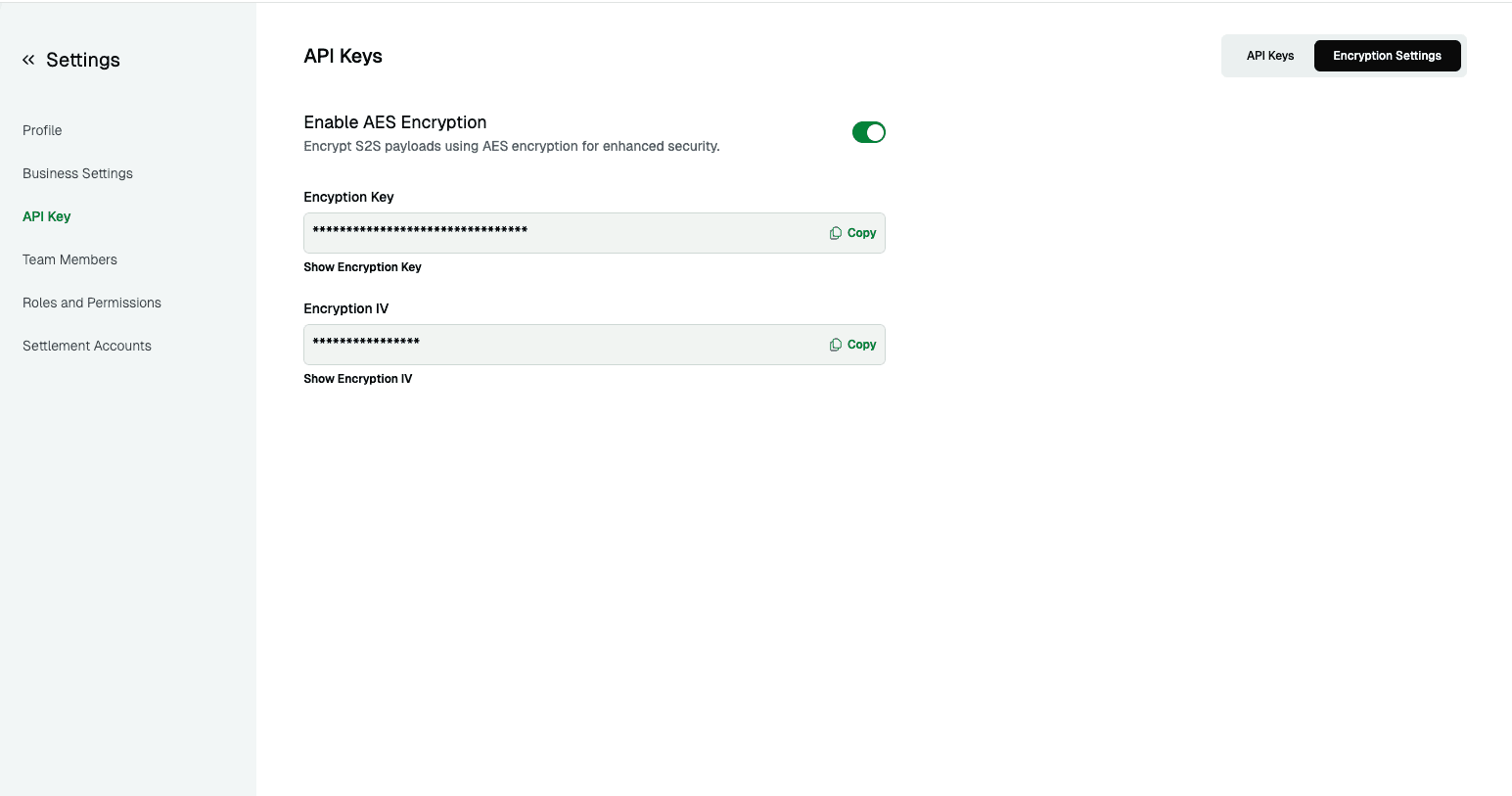
- Navigate to Settings > API Keys > Encryption Settings
- Toggle “Enable AES 256 Encryption”
- Your encryption key and IV will be automatically generated
Step 2: Retrieve Encryption Credentials
Once enabled, you’ll receive:
- Encryption Key: 32-byte AES 256 key (base64 encoded)
- Initialization Vector (IV): 16-byte IV (base64 encoded)
⚠️ Security Note: Store these credentials securely alongside your API keys.
Key Management
Regenerating Encryption Credentials
If your encryption credentials are compromised:
- Navigate to Settings > API Keys > Encryption Settings
- Disable AES 256 encryption
- Re-enable AES 256 encryption
- New encryption key and IV will be generated automatically
- Update your integration with the new credentials
Implementation
Encryption Process
- Prepare Payload: Convert your JSON payload to string
- Encrypt: Use AES 256 CBC with your key and IV
- Encode: Base64 encode the encrypted data
- Send: Include encrypted payload in request body
Request Format
When using encryption for S2S APIs, send requests with:
{
  "data": "ENCRYPTED_PAYLOAD"
}
Where ENCRYPTED_PAYLOAD is your base64 encoded encrypted data.
Code Examples
const crypto = require('crypto');

function encryptPayload(data, key, iv) {
  try {
    const algorithm = 'aes-256-cbc';

    // Truncate IV to 16 bytes and convert to buffer
    const ivTruncated = iv.substring(0, 16);
    const keyBuffer = Buffer.from(key, 'utf-8');
    const ivBuffer = Buffer.from(ivTruncated, 'utf-8');

    // Create cipher
    const cipher = crypto.createCipheriv(algorithm, keyBuffer, ivBuffer);

    // Encrypt data and return as hex
    let encrypted = cipher.update(JSON.stringify(data), 'utf-8', 'hex');
    encrypted += cipher.final('hex');

    return encrypted;
  } catch (error) {
    return ''; // Handle encryption errors gracefully
  }
}Response Handling
Encrypted Responses
When AES 256 encryption is enabled for your S2S account, all API responses will also be encrypted using the same encryption key and IV. The API will return responses in the following format:
{
  "data": "ENCRYPTED_RESPONSE_DATA"
}
You must decrypt the response data to access the actual API response content.
Decryption Implementation
const crypto = require('crypto');

function decryptResponse(encryptedData, key, iv) {
  try {
    const algorithm = 'aes-256-cbc';

    // Truncate IV to 16 bytes and convert to buffer
    const ivTruncated = iv.substring(0, 16);
    const keyBuffer = Buffer.from(key, 'utf-8');
    const ivBuffer = Buffer.from(ivTruncated, 'utf-8');

    // Create decipher
    const decipher = crypto.createDecipheriv(algorithm, keyBuffer, ivBuffer);

    // Decrypt data (input is hex-encoded)
    let decrypted = decipher.update(encryptedData, 'hex', 'utf8');
    decrypted += decipher.final('utf8');

    return JSON.parse(decrypted);
  } catch (error) {
    return null; // Handle decryption errors gracefully
  }
}Test & Verify Endpoint
You can test and verify your encryption implementation using our dedicated test endpoints:
Encryption Endpoint
Endpoint: /api/s2s/aes-encrypt
Method: POST
Headers:
iv- Your encryption IVkey- Your encryption key
Request Body: JSON string to encrypt
Example Request:
curl -X POST https://api.sayswitchgroup.com/api/s2s/aes-encrypt \
  -H "iv: YOUR_ENCRYPTION_IV" \
  -H "key: YOUR_ENCRYPTION_KEY" \
  -H "Content-Type: application/json" \
  -d '{"amount": 1000, "currency": "NGN"}'
This endpoint will return the encrypted version of your JSON payload, allowing you to verify your encryption implementation.
Decryption Endpoint
Endpoint: /api/s2s/aes-decrypt
Method: POST
Headers:
iv- Your encryption IVkey- Your encryption keyContent-Type: application/json
Request Body: JSON object with encrypted_data field
Example Request:
curl --location 'https://backendapi.sayswitchgroup.com/api/s2s/aes-decrypt' \
  --header 'iv: YOUR_ENCRYPTION_IV' \
  --header 'key: YOUR_ENCRYPTION_KEY' \
  --header 'Content-Type: application/json' \
  --data '{
    "encrypted_data": "YOUR_HEX_ENCODED_ENCRYPTED_DATA"
  }'
This endpoint will return the decrypted JSON payload, allowing you to verify your decryption implementation and test the complete encryption/decryption cycle.
Security Best Practices
-
Credential Protection
- Store encryption keys securely in environment variables
- Never expose keys in client-side code
- Use different keys for test and live environments
-
Key Rotation
- Rotate encryption credentials regularly
- Immediately regenerate if compromise is suspected
- Test new credentials before deploying to production
-
Implementation Security
- Validate decrypted data structure
- Implement proper error handling for decryption failures
- Log encryption/decryption errors for monitoring
Troubleshooting
| Issue | Cause | Solution |
|---|---|---|
| Decryption failure | Wrong key/IV | Verify credentials from dashboard |
| Invalid encrypted data | Encoding issue | Check base64 encoding/decoding |
| Endpoint error | Unsupported endpoint | Verify endpoint supports encryption |
| Key generation failed | Dashboard issue | Disable and re-enable encryption |
Testing Encryption
- Enable Test Encryption: Use test environment encryption settings
- Validate Implementation: Test with simple payloads first
- Error Handling: Test with invalid keys to verify error handling
- Performance: Monitor encryption/decryption impact on response times
Support
For assistance with payload encryption:
- Technical Support: support@sayswitch.com
- Security Questions: security@sayswitch.com
- Documentation: API Reference